Fundamentals of Agents
Agents and LangGraph
Agents come in many different forms, each with varying levels of autonomy and control. Understanding these distinctions is crucial for building effective AI systems.
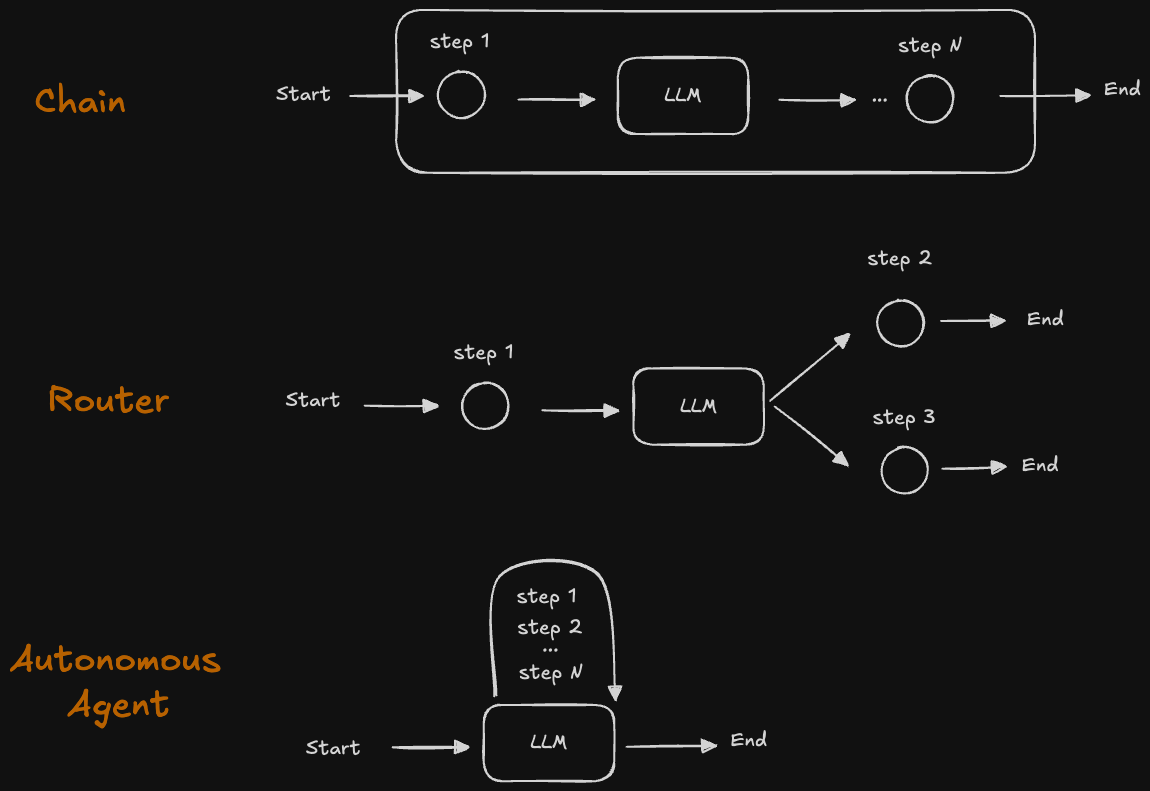
Chain is a set of steps before and after an LLM call. It’s very reliable, with the same control flow every time, making it predictable and easy to debug.
Router Agents represent a type with low-level control. As shown in the diagram above, a router agent has a limited set of predefined options (e.g., choosing between step 2 or step 3) that the LLM can select from. The decision-making is constrained to these specific pathways, providing more predictable behavior.
Autonomous Agents, in contrast, operate with greater flexibility. They can navigate through any sequence of steps from a given set of options, or even dynamically generate their own next actions based on available resources and context. This autonomy allows for more adaptive behavior but also requires more sophisticated orchestration.
LangGraph is designed to help you build agents that balance reliability with control. The pillars of LangGraph include persistence, streaming, human-in-the-loop, and controllability.
LangGraph Key Components
State is a shared data structure that represents the current snapshot of your application. It’s an object that gets passed between nodes and edges of the graph. It can be any data type, but is typically defined using a shared state schema.
Nodes are functions that encode the logic of agents. They receive the current state as input, perform logic operations, and return an updated state.
Edges are functions that determine which node to execute next based on the current state. They can be conditional branches or fixed transitions.
State holds the shared data, nodes perform the work by updating the state, and edges determine what to do next based on the state.
A Simple Graph Example
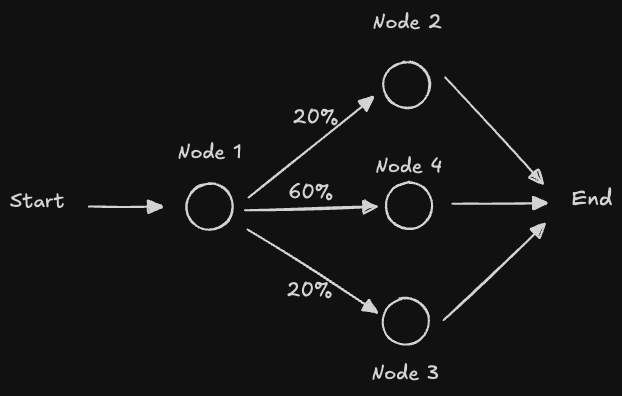
Below is a simple graph example using LangGraph. It has 3 nodes and one conditional edge.
Installation
First, install the required dependencies:
pip install --quiet -U langgraphCode Implementation
Imports
from typing_extensions import TypedDict
from typing import Literal
import random
from langgraph.graph import StateGraph, START, END
from IPython.display import Image, display
State Definition
The State schema serves as the input schema for all nodes and edges in the graph. We use TypedDict, which provides type hints for the keys.
class State(TypedDict):
    graph_state: str
Key Points:
- The state is a
TypedDictthat defines the structure of data flowing through the graph - All nodes can access and modify the state
- The state is passed as the first argument to each node function
Node Functions
Nodes are Python functions that process the state. Each node:
- Receives the current state as the first positional argument
- Can access state keys using dictionary syntax:
state['graph_state'] - Returns a dictionary with updated state values
- By default, returned values override the prior state
def node_1(state):
    """First node that adds ' I am' to the graph state."""
    print("---Node 1---")
    return {"graph_state": state['graph_state'] + " I am"}


def node_2(state):
    """Second node that adds ' happy!' to the graph state."""
    print("---Node 2---")
    return {"graph_state": state['graph_state'] + " happy!"}


def node_3(state):
    """Third node that adds ' sad!' to the graph state."""
    print("---Node 3---")
    return {"graph_state": state['graph_state'] + " sad!"}


def node_4(state):
    """Fourth node that adds ' Indifferent!' to the graph state."""
    print("---Node 4---")
    return {"graph_state": state['graph_state'] + " Indifferent!"}
Edge Functions
Edges connect nodes in the graph:
- Normal Edges: Always route from one node to another (e.g.,
node_1→node_2) - Conditional Edges: Optionally route between nodes based on logic
Conditional edges are implemented as functions that return the next node to visit based on the current state.
def decide_mood(state) -> Literal["node_2", "node_3", "node_4"]:
    """
    Conditional edge function that decides which node to visit next.

    Routing probabilities:
    - 20% → node_2 (happy)
    - 60% → node_4 (indifferent)
    - 20% → node_3 (sad)
    """
    user_input = state['graph_state']

    # Random decision logic
    if random.random() < 0.2:
        return "node_2"  # 20% chance
    elif random.random() < 0.8:
        return "node_4"  # 60% chance
    else:
        return "node_3"  # 20% chance
Note: In a real application, you would typically use the state content to make routing decisions rather than random selection. For example, you might analyze the text content or use an LLM to determine the appropriate next step.
Graph Construction
Build the graph by:
- Initializing a
StateGraphwith theStateclass - Adding nodes to the graph
- Adding edges (normal and conditional)
- Compiling the graph to validate its structure
# Initialize the graph builder
builder = StateGraph(State)

# Add all nodes
builder.add_node("node_1", node_1)
builder.add_node("node_2", node_2)
builder.add_node("node_3", node_3)
builder.add_node("node_4", node_4)

# Entry point
builder.add_edge(START, "node_1")

# Conditional routing
builder.add_conditional_edges("node_1", decide_mood)

# Exit points
builder.add_edge("node_2", END)
builder.add_edge("node_3", END)
builder.add_edge("node_4", END)

# Compile the graph (performs validation)
graph = builder.compile()
You can view the graph by running the command below:
display(Image(graph.get_graph().draw_mermaid_png()))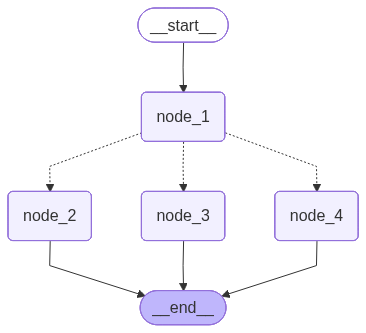
Graph Execution
Now we can invoke the graph:
result = graph.invoke({"graph_state": "Hi, this is Gen."})
print(result)
The result below shows the execution path through node 1 and node 4:
---Node 1---
---Node 4---
{'graph_state': 'Hi, this is Gen. I am Indifferent!'}